How to automatically announce new features to your users

Posted by
Latest Posts

Every feature we ship in Sabi now ships with its own blog post, and the latest one shipped with a 30-second video too. The builder prompts one skill, the agent writes the post in our voice, generates the thumbnail, and saves it as a draft only admins can see. We read it, ask for changes, and hit publish or set a date. No code gets pushed.
Since we set this up on September 3, the Sabi blog has grown from 0 to 46 posts.
This article has enough detail that you can hand it to your own coding agent and have it build the same thing.
Stop using a blog editor
Announcing a feature used to mean someone opening WordPress, Webflow or Squarespace, pasting text into a block editor, hunting for an image, and hitting publish a week after the feature went live. That person rarely built the feature, so the post was a second-hand summary.
Today, an AI builder who shipped the feature already knows what it does and why a customer would care. The human can kick off a skill that writes the post.
How it works
A feature lands, someone runs the post skill, and the published post becomes the source for everything downstream: the link you email your users, the social posts, and the video.
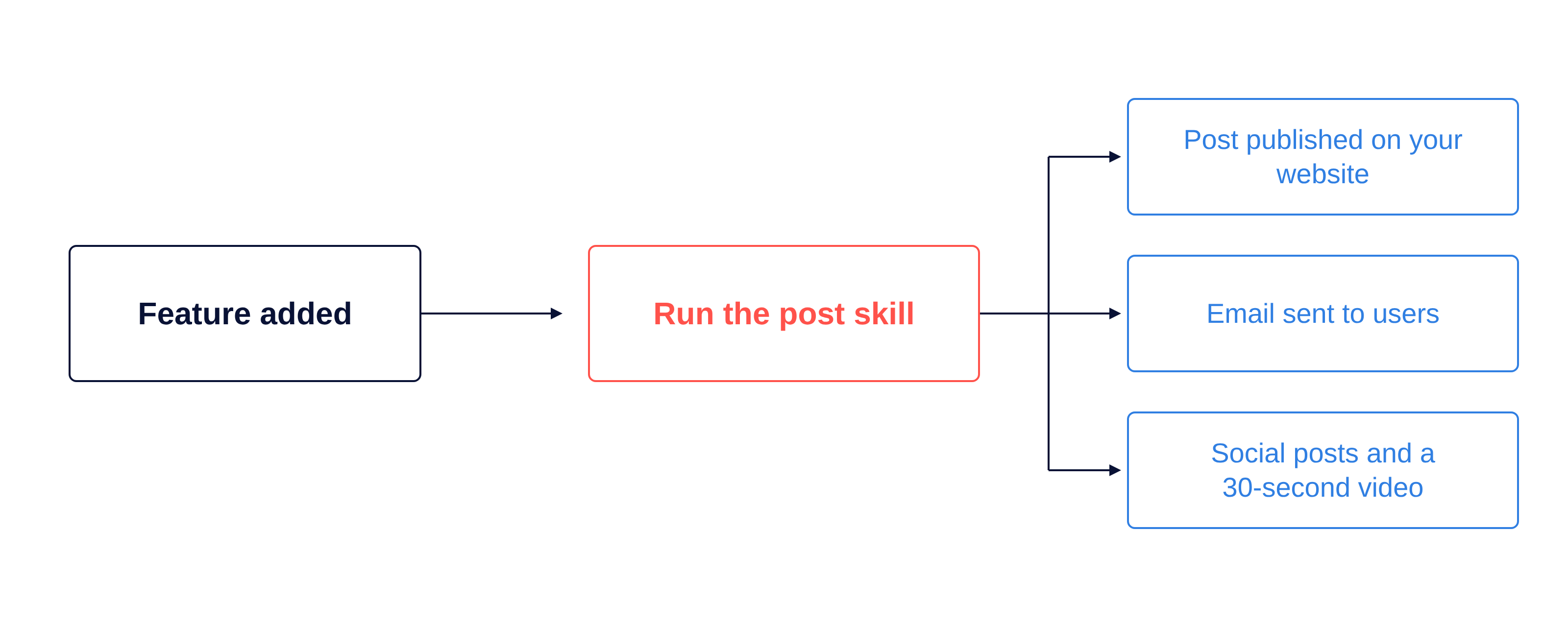
| Part | What it is | Where it lives in Sabi |
| A posts table and page | One table, one public list page, one article page, admin-only drafts | public.posts, /posts, /posts/[slug] |
| A writing skill | A markdown file that tells the agent how to research, write, lint, illustrate and save a post | .claude/skills/seo-blog-post/ plus two variants |
| A video skill | A kit that turns a finished post into a 30-second product video in landscape and portrait | .claude/skills/post-video-how-to/ |
You need the first two to get value. The third gets its own section.
Step 1: Add a posts table and a posts page
In Sabi it was one migration and two pages. Everything after it is prompting.
The posts table. One row per post: slug, title, description, body as markdown and rendered HTML, featured image, author, categories, a status of draft, published or archived, a publish timestamp, SEO fields, and a JSON column for anything a later skill needs.
Visibility rules, as row-level security: visitors read a row only when it is published and the publish date has passed; admins read every row; only the agent's service key can write. That is scheduling and review in one. A draft has a real URL an admin can open, everyone else gets a 404.
Two pages. /posts lists published posts newest first. /posts/[slug] renders the body and author, and sets noindex, nofollow on anything not published.
No editor, edits happen by prompting, and the draft at its real URL is the preview.
Step 2: Write the skill that writes the posts
A skill is a markdown file in your repo that a coding agent reads before doing a job. Ours live in .claude/skills/ and work with Claude Code, Codex and Devin. The skill holds your voice, format rules and safety rails, so you never repeat them.
Sabi has one base skill and two variants:
| Skill | What it produces | When we run it |
seo-blog-post | A guide or how-to that answers a real search query | A feature ships, or a question keeps coming up in support |
post-create-new-update | The "What we shipped this week" changelog | Every Thursday |
post-sabi-vs-app | A "Sabi vs [competitor]" comparison with logo-headed tables | We find a competitor worth comparing to |
All three end the same way: a draft row in posts. None opens a pull request. Publishing is a human decision. Here is what the base skill covers, in order.
The facts rule
Product facts come from the code and the database, never from memory. The comparison skill ships a script that prints today's pricing, the number of enabled connectors, and the author's name straight from the repo, and the agent quotes that output while writing.
We added this after the first comparison post got four facts wrong, including the price. The fix was not "be more careful." It was a script the agent has to run before it can write a number.
Voice and format
The skill spells out the voice in rules the agent can check: short paragraphs, one answer sentence at the top of every section, tables for more than two facts on one axis, bold numbers in tables, inline links on every sourced claim. Every time we edit a draft, the correction goes back into the skill, so the next post inherits it.
Links, tables and logos
The agent adds hyperlinks as it writes, because it has the source in front of it. A post about connecting a bank through Plaid links to Plaid's own numbers. A comparison fetches the competitor's pricing page and cites it inline with an "as of" date. A helper script looks up both companies' logos, uploads them to storage, and prints the table header row, so every comparison table gets a Sabi mark and a competitor mark above the columns.
The thumbnail
The agent generates the featured image with Higgsfield. The skill holds four approved style prompts (isometric on navy with coral, the same with blue, a coral line-art style, and a light minimal 3D style), and the agent picks one that differs from the last few posts. The image is 16:9, has no text, and uses one concrete metaphor for the post's idea. Its URL lands in featured_image_url.
Save as a draft
A script reads the markdown, renders the HTML, and inserts or updates one row in posts with status = 'draft'. It uses the app's own environment file for the connection, so the agent never needs credentials in chat.
Step 3: Trigger the Build When you Merge the PR
This is the part that changed how we ship. The prompt is short:
Read the PR for the Plaid bank connector. Write a guide post about it with the seo-blog-post skill. Draft only.Minutes later there is a draft only we can see, with the right connector name, the right account types, inline links to Plaid's documentation, and a thumbnail. If something is off, the next prompt is the edit:
Here’s a few recent posts:
- AI Budgeting App With Real Bank Data: Sabi Now Connects via Plaid, a feature guide written from the PR that shipped it.
- What We Shipped This Week: September 17 – 24, 2026, the Thursday changelog, built from the week's merged pull requests.
- Sabi vs MyGentic, a comparison with logo-headed tables and pricing pulled from both sides that day.
- Connect your Shopify store to Sabi, a how-to that came out of a support question.
This week we added a skill that turns a finished post into a 30-second product video, in 16:9 for YouTube and the website and 9:16 for Reels, TikTok and Shorts.
We built it with Claude Opus as motion graphics rather than a video generator, because we wanted the real product UI on screen. The kit is a web page that plays the animation, a cue sheet that times every scene to the music, and a renderer that records it.
Our Format
- 30 seconds at 104 BPM, so scene changes land on downbeats.
- One music track, one voice, Sabi's type and colors.
- The same story shape in the same bars: what it is, three steps, the payoff, three benefits, sign-off with logo and URL.
If you set this up and get stuck, send me the draft your agent produced. I would like to see it.
AI-First App Founders
Don't miss a post
Practical notes on building AI-first apps from the Inovo team.